Online Auto Clicker – Free Browser Demo
Try a free online auto clicker with no download or extension. Choose a speed and run a three-point sequence in this browser tab.
This page only: the demo cannot click other tabs or desktop apps. Read the three steps · See the Windows app
Start your click sequence
Free · no sign-upKeyboard: Space start or stop (like F6) · Esc emergency stop (like F8). Clicks stay on these three targets.
Ready. Choose a preset or start your own sequence.
How to use the online auto clicker
Choose the interval
Use 1 CPS, 2 CPS or 4 CPS to start a preset immediately. For your own settings, enter the interval in milliseconds and a total click count. At 500 ms, the configured rate is 2 clicks per second.
Start and watch the targets
Select Start sequence. The counter advances through Point A → Point B → Point C, then repeats until the total is reached. The targets and live total show what has happened. These are demo counters inside this page, not clicks sent to another app.
Stop or try a new setting
Select Stop or press Esc to stop early. With focus outside an input or link, Space starts or stops. Change the settings after the run, then start again; the counters reset for the new run. Use Copy setup link to share your interval and click count, or Copy result after a run. A shared setup loads ready to review and never runs automatically.
The demo accepts 25–60,000 ms and 1–5,000 clicks. Browser scheduling and a backgrounded tab can change the observed timing; the displayed CPS is the configured rate, not a measured speed guarantee.
This browser demo vs Free Auto Clicker 9.0.1
| Capability | This page | Windows app |
|---|---|---|
| Where clicks go | Only the three targets on this page | A permitted, visible foreground window |
| Multi-point sequence | A → B → C on this page | Ordered point lists, or mouse and keyboard event recordings |
| Hotkeys | Space and Esc in this tab | F6 start/stop, F11 capture, F8 emergency stop |
| Window-relative positions | No | Workflow actions and recording playback use a named window’s client coordinates |
| Pixel conditions and profiles | No | Image/color conditions and local workspace JSON or .facbackup |
How this online auto clicker works
The page fires clicks in order: Point A, then B, then C, then A again, using your interval. A 500 ms interval is 2 clicks per second. The minimum interval is 25 ms to keep the tab responsive.
Why it cannot click another site or app
Browsers isolate tabs and block ordinary pages from sending trusted input into other websites or desktop programs. That is a security rule, not a missing button.
Need to click a button on another website?
Use the Web Auto Clicker bookmarklet instead. You start it on the page you want to automate, so it can repeat clicks on a button you pick there, with no download or extension. It still cannot click other tabs, the browser toolbar or desktop apps.
Open the Web Auto ClickerFor coordinates, color waits, schedules, and saved profiles, use the desktop workflow guides.
Set up the Windows app with real screen coordinates
The Windows app works with your desktop target; this online demo stays inside its own page. These screenshots show example configurations in Free Auto Clicker 9.0.1.
Set a bounded first run
Open Quick click. For the example shown, use Left, Single, a standard Interval of 1000 ms and Repetitions = 10. Choose Fixed point and Pick screen coordinate, then click the intended target; Esc cancels.
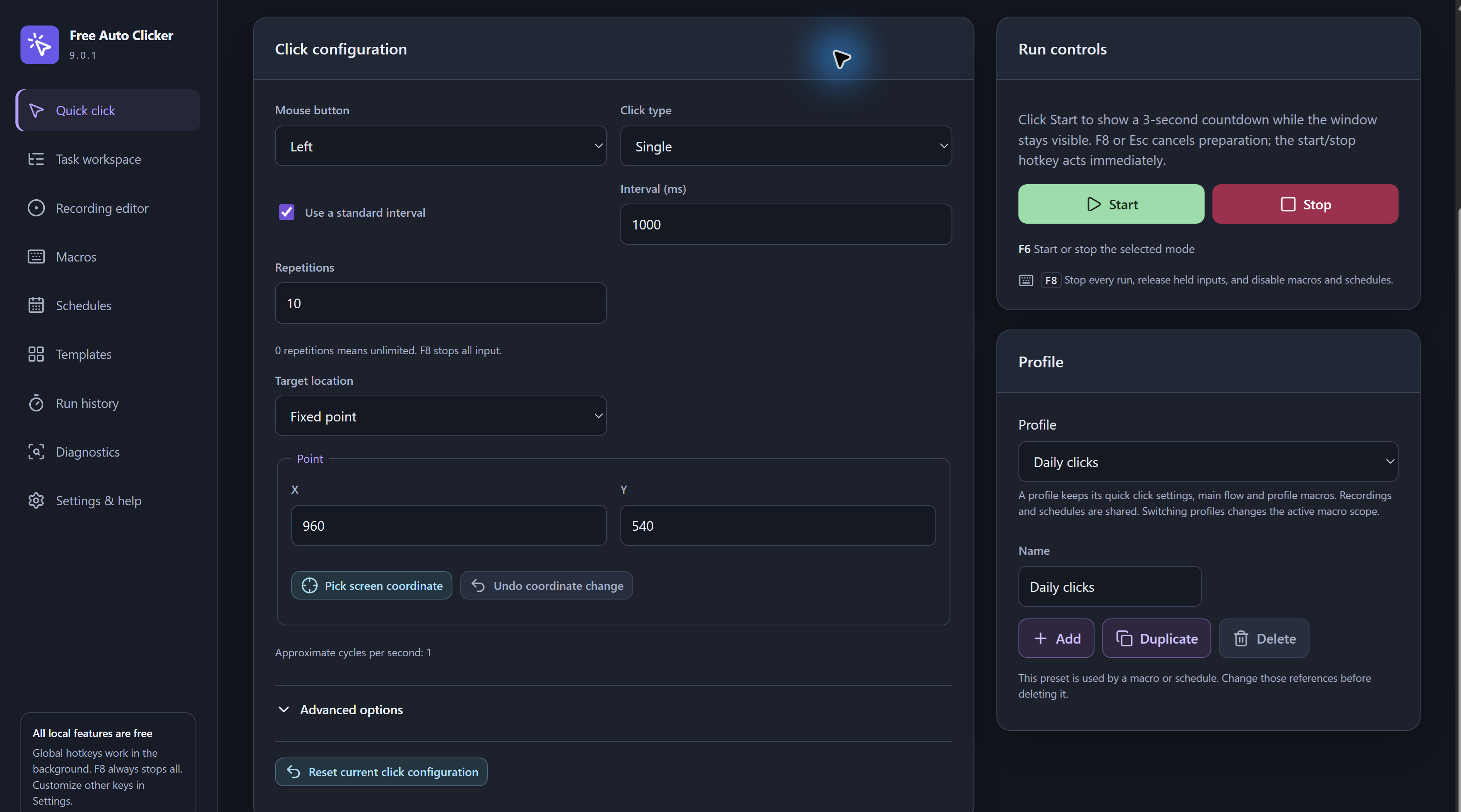
Quick click example: fixed point, 1000 ms interval and 10 repetitions. English · Dark theme. Build a sequence if needed
Choose Multiple points and add coordinates in order. The list shares its button, click type and Delay between points; one repetition visits the whole list. Use a task flow for different per-step actions or waits.
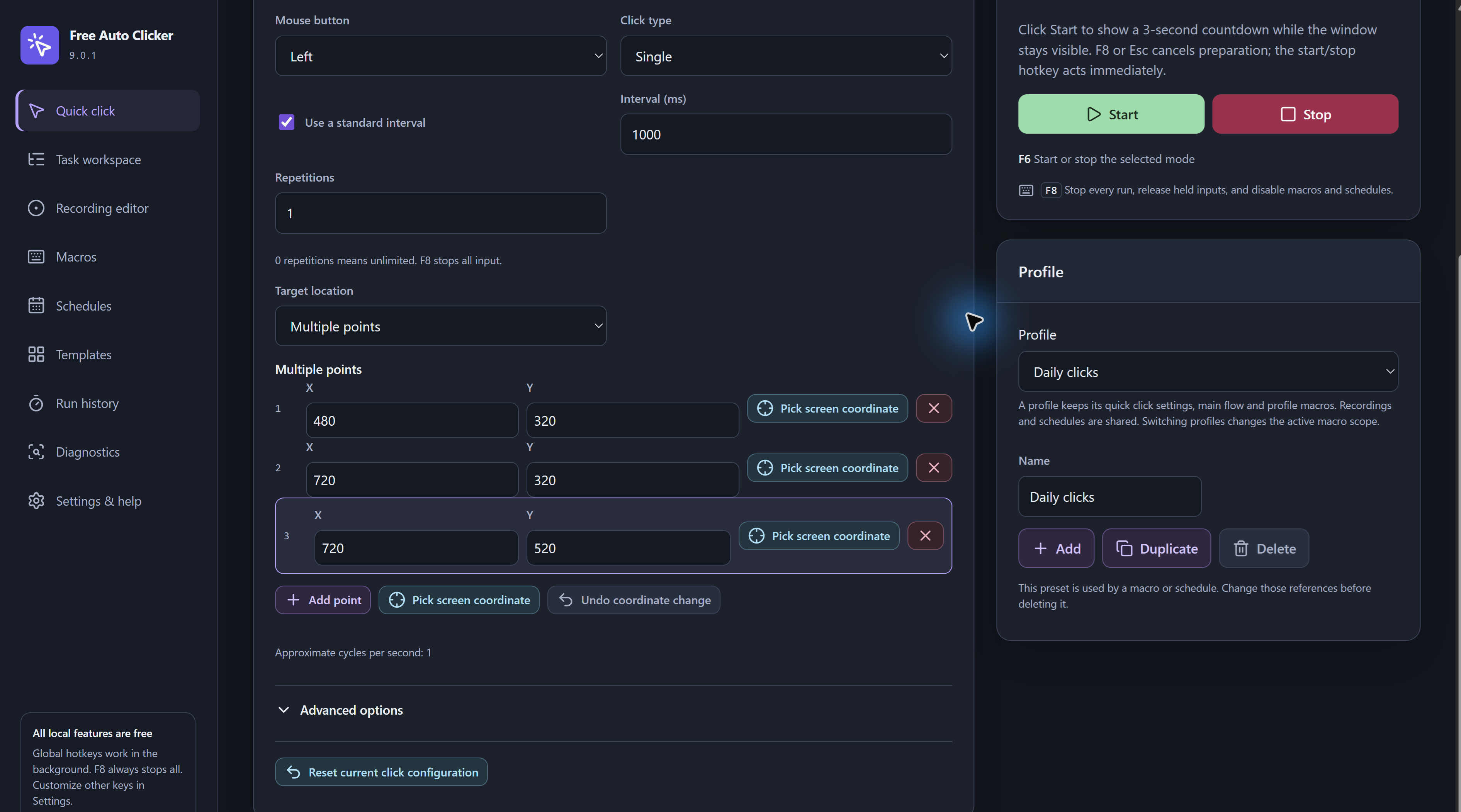
Multiple points example with shared click settings. English · Dark theme. Keep the stop key ready
Prepare the visible target, then press F6 to run the selected mode. F8 stops all tasks and disables macros and schedules. Start with a small repetition count and review the result before extending the task.


Download Free Auto Clicker for WindowsRead the complete Windows guide
Online auto clicker FAQ
Do I need to download anything to try this?
No. This demo runs in your browser. Download Free Auto Clicker when you need clicks outside this page, saved profiles, or Windows coordinates.
Can I auto click on another website without downloading anything?
Yes. The Web Auto Clicker is a free bookmarklet: you start it on the page you want to automate, pick a button and set an interval. It clicks only on that page and stops with Esc. This demo page itself cannot click other tabs.
Can this click several points?
Yes, but only the three targets on this page. The Windows app records real screen coordinates and can replay longer sequences.
Can I use this on a Chromebook or school computer?
Yes, as a page demo. It still cannot click other tabs, locked exam browsers, or desktop apps. School or work policies may also restrict automation tools. See auto clicker for Chromebook.
Why can this not click another tab or a Windows app?
Browsers block ordinary pages from sending trusted clicks into other sites or programs. The Windows app is the path for multi-point desktop automation.
How do I choose an interval?
Start with the 1 CPS preset, then try 2 CPS. Use the click interval calculator or a CPS test if you want a number first.
When should I download the Windows app?
Download when you need repeating clicks in another program, captured coordinates, window-relative points, pixel conditions, schedules, or F6/F8 hotkeys everywhere on the desktop.
Need to click outside this demo page?
Free Auto Clicker 9.0.1 provides multi-point Windows automation with hotkeys, conditions, profiles, and safety limits.
Ready to automate the clicks on your PC?
Free Auto Clicker repeats clicks at your chosen interval in a visible foreground Windows app.
Download for WindowsWindows 10/11 · x64 · Free · v9.0.1