Free Auto Clicker for Windows 11
Download the free x64 Windows application, choose a visible target and verify a three-click run. This Windows 11 setup guide covers opening the app, checking the controls and stopping with F8.
Download for WindowsWindows 11 · x64 installer · Free · Version 8.1.0
WINDOWS 11 · X64 · VERSION 8.1.0
Download, check the file, then run a short test
This page takes you from the Windows installer to three slow, single clicks on a visible target. Use a fixed point first; add more points only after that test works.
File: FreeAutoClicker.exe
Download type: Windows desktop installer
Check the published download details · Review security and installation information
1. Install and open the Windows application
- Download the installer. Use the button on this page. Check the exact file you received against the published verification details; your browser may add a number to the filename if you have downloaded it before.
- Review setup before proceeding. Open the downloaded file and read its choices and any Windows prompt. Review the source and your security software’s assessment if a warning appears. The installation and security page explains what to check.
- Finish setup and open Free Auto Clicker. Search for its name from Windows Start. Keep the app available while you prepare a harmless target, then switch to that target before starting the run.
The download is for an x64 Windows PC. It is a desktop application, so its clicks can reach a permitted, visible foreground target outside this site. If you only want to explore timing without installing, use the online demo.
2. Check your setup with three clicks
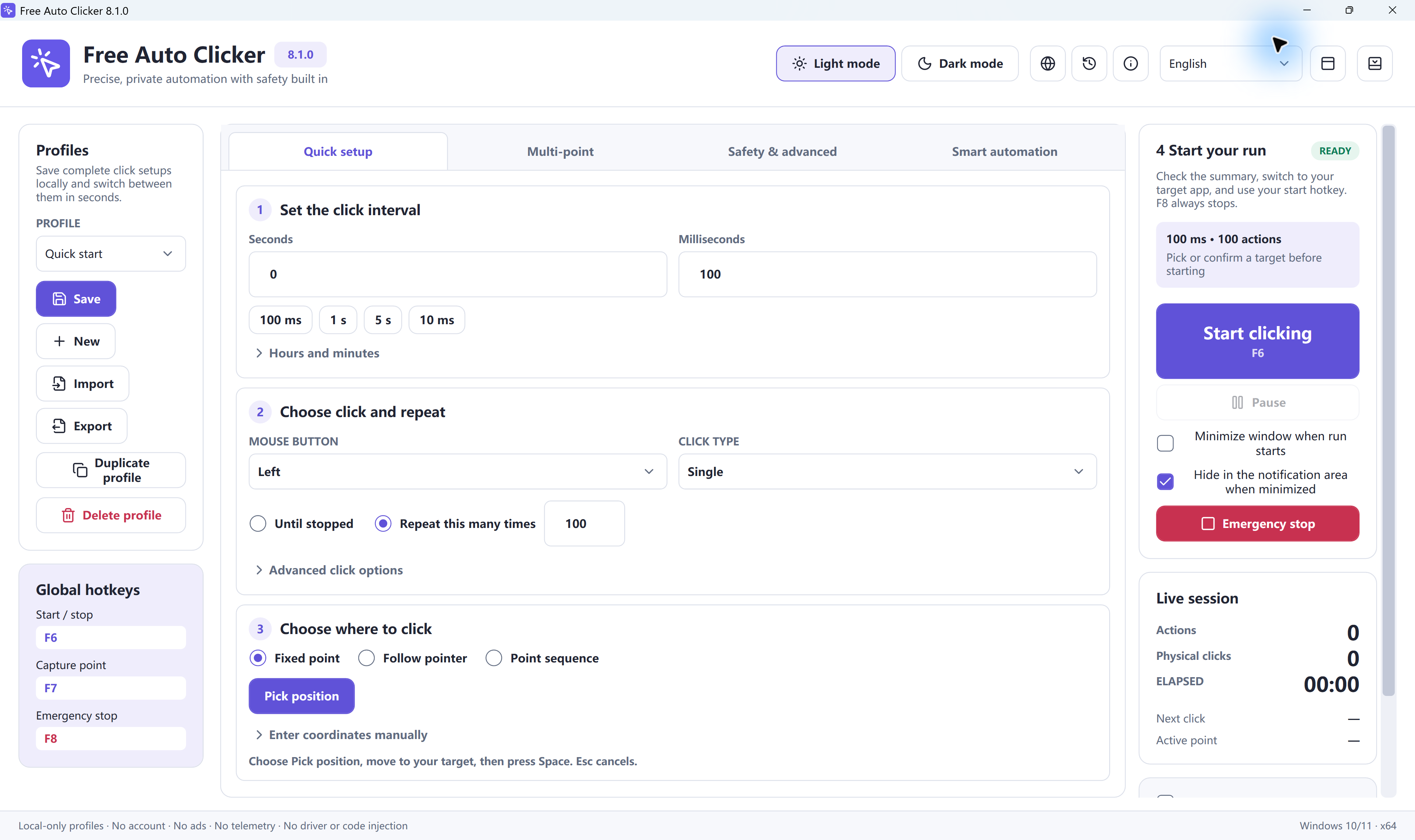
Open a blank spreadsheet and use cell A1 as the target. Keep its window position and zoom unchanged after picking the point. These instructions use the English control names shown in the screenshots.
Start with a fresh test profile
Keep any settings you need with Profiles → Save, then select New. In Quick setup, set Hours = 0, Minutes = 0, Seconds = 1 and Milliseconds = 0.
Choose a single left click and a limit
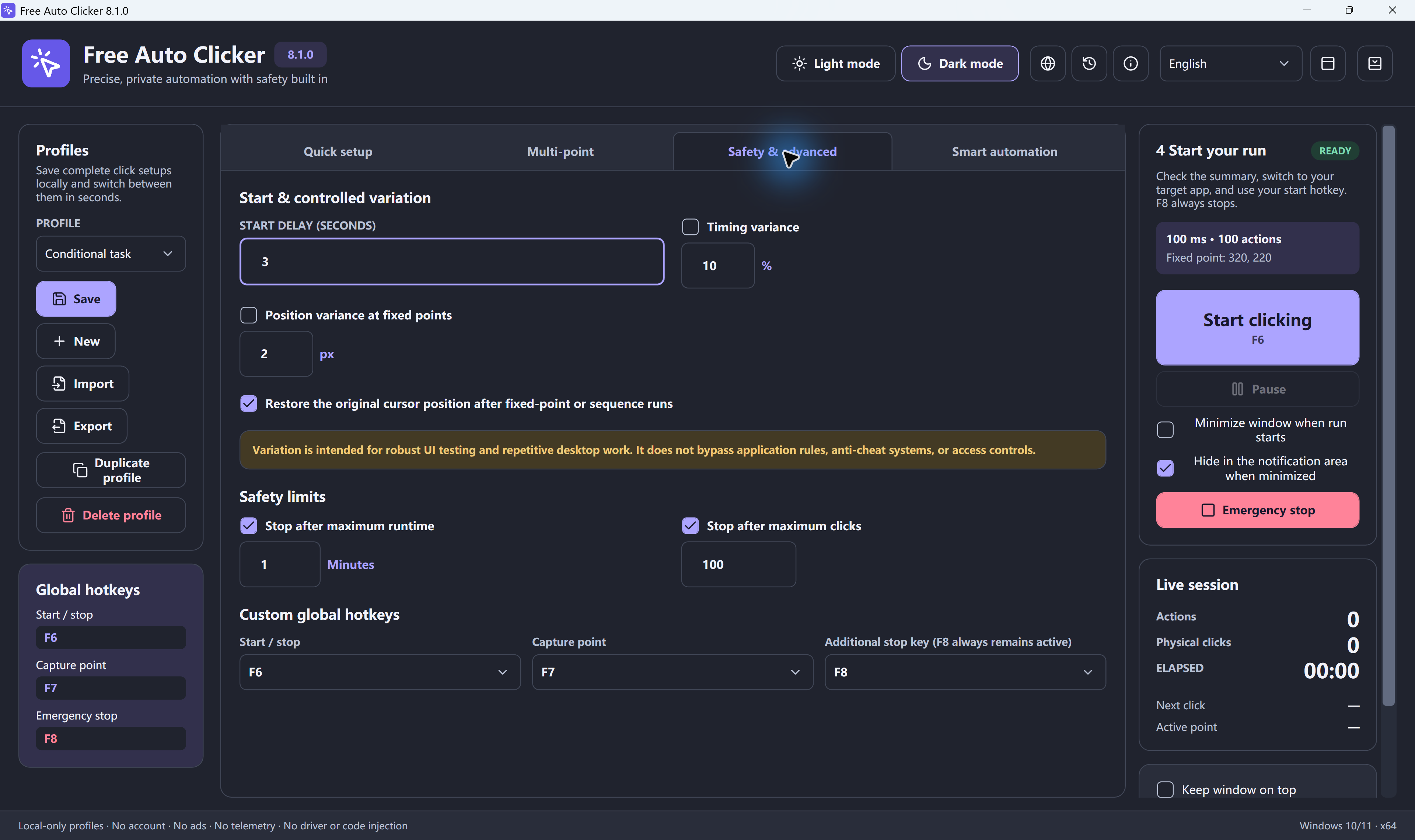
Set Mouse button = Left, Click type = Single and Repeat this many times = 3. In Safety & advanced, set Start delay (seconds) = 0. If Stop after maximum clicks is enabled, set it to 3. If Stop after maximum runtime is enabled, use 1 minute, its minimum value.
Pick the visible target
Select Fixed point → Pick position, or open the picker with the default F7 shortcut. Move the pointer to the center of A1 and press Space to confirm. Esc cancels selection; F7 alone does not confirm the point.
Switch back and run the test
Check the summary and Start/stop key in Global hotkeys. Bring the spreadsheet to the foreground and select another empty cell. Press the configured start key, F6 by default, and leave the mouse alone. A1 should become selected and the run should end after three single clicks. Press F8 immediately if the target is wrong.
What this proves: the app can reach the selected cell and stop at your repeat limit. Selecting A1 does not count the clicks for you; to check individual presses, use the mouse button test and the full getting-started guide.
3. Choose how the target is located
| Mode | What it does | What to check |
|---|---|---|
| Fixed point | Repeats clicks at a saved screen position. | Pick the position after placing the target window. Recheck it after scrolling, resizing or changing display scale. |
| Follow pointer | Clicks where your pointer is at that moment. | Keep the pointer over the intended target; moving it changes where clicks land. |
| Point sequence | Visits enabled Multi-point rows in order. | Check each row’s coordinates, Delay ms and Repeat, plus the overall repeat limit. |
All three modes use the real pointer and a visible foreground target. They do not click minimized or hidden windows. Window-relative positions can follow a chosen window’s movement, but do not recognize a button after the contents rearrange.
For a sequence, follow the multi-point guide. To adjust the rate, see intervals and stop conditions or the ms-to-CPS calculator. A calculated rate is not a guarantee that another application will accept every click.
If the first run does not behave as expected
- The shortcut does nothing
- Check the current Start/stop assignment and conflict messages in Global hotkeys. Some keyboards require Fn for function keys. If Hold to run is selected, keep the start key pressed. See the hotkey guide.
- The click lands beside the target
- Stop with F8, put the window where you want it and pick the position again. Recheck the point after changing monitor arrangement, resolution, display scale or zoom.
- The run stops early or waits before starting
- Read the status and check the repeat count, maximum clicks, maximum runtime and Start delay. Keep the floating control bar away from the target; a click directed at that bar stops the run.
- One application does not accept the clicks
- First confirm the same slow, limited setup works on a harmless target. Keep the destination visible and check its automation rules. Some programs reject simulated input; Free Auto Clicker does not bypass their restrictions.
Use the Windows troubleshooting guide for display, timing, shortcut and permission symptoms. Do not shorten the interval to compensate for a wrong target or a blocked input method.
Windows download or browser demo?
Use the desktop app for a Windows target
Choose the installer when you need a permitted visible target outside this page. Save tested settings locally with Profiles → Save. Use Export to create a separate .fac file and Import to bring it back; recheck positions and limits after switching machines or displays.
Use the demo to explore the timing
The browser demo runs only on its own A, B and C targets. It can help on a phone, Mac or Chromebook too, but it does not control other tabs, games, applications or the device interface. The .exe download is for Windows.
Find or remove the app in Windows 11
After installation, search for Free Auto Clicker from Start to open it. To remove it, first stop any active run and close the app. Find its entry under Settings → Apps → Installed apps and choose Uninstall from that entry’s menu.
Export profiles you want to keep before removal. Microsoft documents this route and the Control Panel alternative in its Windows uninstall instructions.
Windows 11 download questions
Which download should I use on a Windows 11 PC?
The download button on this page provides FreeAutoClicker.exe, the Free Auto Clicker 8.1.0 installer for x64 Windows PCs. It installs a desktop application. After installation, open Free Auto Clicker from Start and use the short, limited test on this page before a longer task.
Is Free Auto Clicker free for Windows 11?
Yes. Version 8.1.0 offered on this site is free to download and use. The separate online demo is also free, but it only operates on its own A, B and C targets inside the browser page.
How do I start, choose a position and stop?
By default, F6 starts or stops a run. F7 opens the position picker; move the pointer to the target and press Space to confirm, or Esc to cancel. F8 remains the emergency stop. Check Start/stop and Capture point in Global hotkeys if a profile uses different shortcuts.
Can I minimize the target window while it clicks?
No. The target must remain visible in the foreground. Free Auto Clicker uses normal Windows mouse input and the real pointer. Window-relative coordinates can follow a window when it moves, but do not enable clicking in minimized or hidden windows or find a button after its internal layout changes.
Can I use the Windows installer on a phone, Mac or Chromebook?
This download is a Windows desktop installer, not a phone, macOS or Chromebook application. On those devices you can try the online browser demo. It cannot click other tabs, games, apps or the device interface.
How do I remove Free Auto Clicker in Windows 11?
Stop any active run and close Free Auto Clicker. In Windows Settings, open Apps and then Installed apps, find Free Auto Clicker and choose Uninstall from its menu. Follow the removal prompts. Export any profiles you want to keep before removing the program.
Set up your first Windows 11 task
Begin with one visible point, a one-second interval and a three-click limit. Check the result before building a longer sequence.
Download Free Auto Clicker for Windows 11By downloading and using the software, you agree to the Terms of Use.
Ready to automate the clicks on your PC?
Use a permitted, visible foreground Windows target. Start with a small click limit and check the result before a longer run.
Download for WindowsWindows 10/11 · x64 · Free · v8.1.0