OP Auto Clicker Alternative for Windows 11 and 10
OP Auto Clicker is a free, portable click repeater. If you need several clicks in order, saved profiles, run limits or a separate emergency stop, Free Auto Clicker 8.1.0 is a free alternative for Windows. Here is how the settings map, and when OP is still the simpler choice.
Download Free Auto ClickerWindows 10/11 · x64 · Free · v8.1.0 · Not affiliated with OP Auto Clicker
Disclosure: we make Free Auto Clicker and are not affiliated with OP Auto Clicker. Details about OP Auto Clicker come from its official page, opautoclicker.com, checked on November 1, 2026.
OP Auto Clicker settings and their Free Auto Clicker equivalents
| Setting | OP Auto Clicker (official page) | Free Auto Clicker 8.1.0 |
|---|---|---|
| Mouse button | Left, right or middle | Quick setup → Mouse button: left, right, middle, X1 or X2 |
| Click type | Single, double or triple | Click type: single, double, triple, or press and hold |
| Interval | Set in the app before you start | Set the click interval: hours, minutes, seconds and milliseconds, 5 ms minimum |
| How many clicks | A number of clicks, or unlimited | Repeat this many times or until stopped, plus runtime and click limits |
| Where it clicks | Follow the cursor, or a fixed spot | Follow pointer, Fixed point (Pick position or F7), or Point sequence |
| Several spots in order | A separate “multiple auto clicker” download | Point sequence in the same app: up to 10,000 points, each with its own delay and repeats |
| Hotkeys | Changeable; work while the app is in the background | F6 start/stop (changeable), F7 capture, fixed F8 emergency stop |
| Saved settings | Saved, including the last fixed location | Up to 200 profiles with .fac import and export |
| Install | Portable | Digitally signed installer (Certum); Windows 11/10 x64 with .NET Desktop Runtime 8 |
| Other systems | macOS and Android versions listed | Windows only |
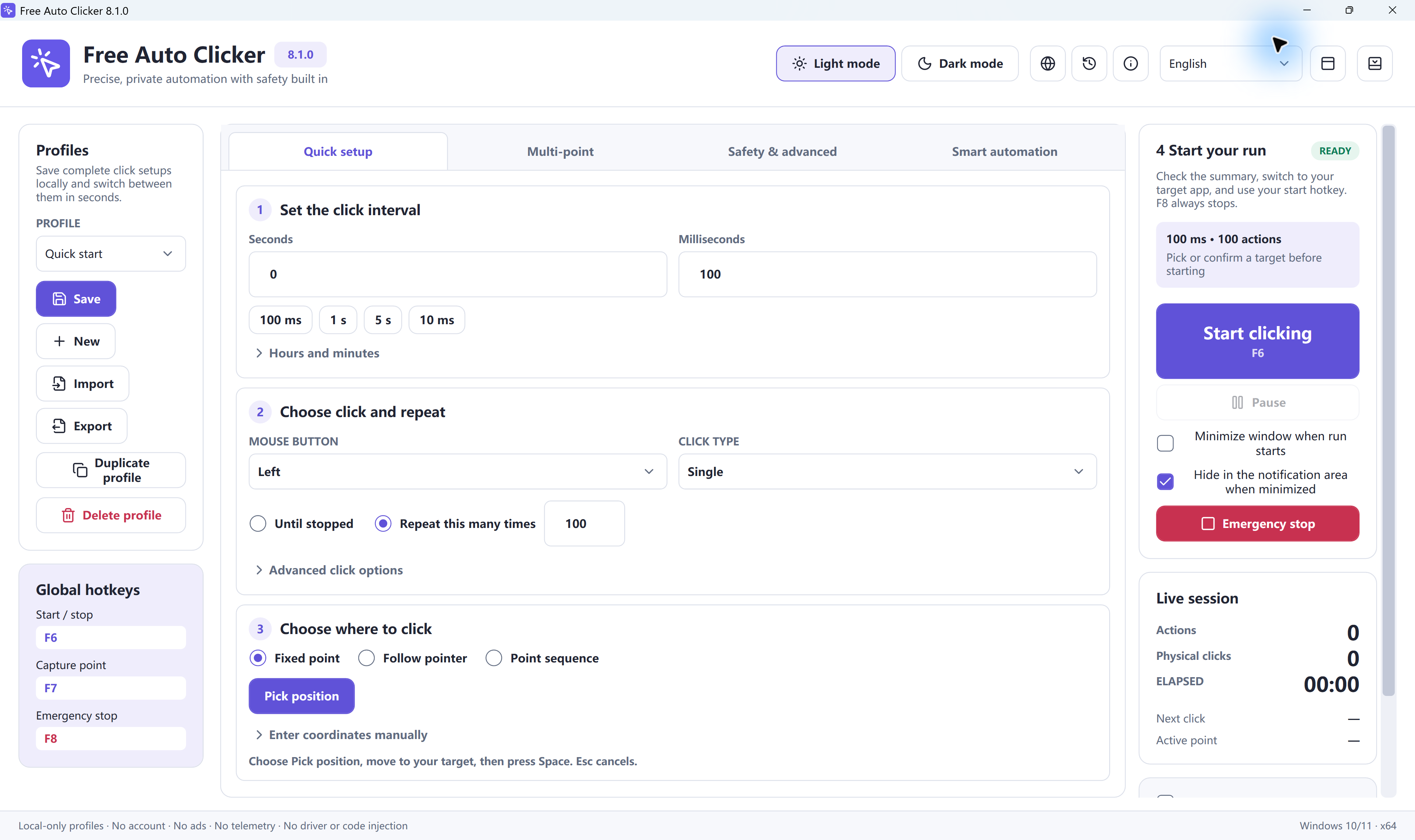
Set up your usual OP click in Free Auto Clicker
- Install Free Auto Clicker 8.1.0 on Windows 11 or Windows 10 (version 2004 or later, 64-bit).
- Set the interval in Quick setup. 100 ms is 10 clicks per second; 1 s is a calm first test.
- Choose the mouse button and click type. Left and Single is the usual start.
- Choose how long it runs: Repeat this many times for a short test, or until stopped.
- Choose where to click. Follow pointer works like following the cursor. For one spot, choose Fixed point, press F7, move to the target and press Space.
- Press F6 with the target window in front. F6 stops; F8 stops immediately.
The first-run guide walks through the same steps with screenshots.
What Free Auto Clicker adds
- Point sequences of up to 10,000 points, with click recording, per-point delays and repeats, and undo/redo. See multi-point clicking.
- Safety limits: repeat counts, maximum runtime and click limits, a start delay and a fixed F8 emergency stop.
- Window-relative targets that stay aligned when a window moves, and pixel color conditions that wait for a visible state.
- A key chord or text after each click, for games or forms that need a key as well. See the auto key presser guide.
- Profiles and history: up to 200 profiles and a local session history with CSV export.
When OP Auto Clicker is the simpler choice
If you only need one spot or the cursor clicked, want a portable file with nothing to install, or use a Mac or an Android device, OP Auto Clicker can be enough. Free Auto Clicker is the better fit when the task has several steps, needs limits, or should stop instantly with a dedicated key.
Download safely
Whichever tool you choose, download it from the developer’s official page and check the publisher before you run it. Free Auto Clicker’s only official download is on this site; see how to verify it.
Frequently asked questions
Is OP Auto Clicker free?
Its official page describes it as free and portable. Free Auto Clicker is also free, with no account.
Can OP Auto Clicker click multiple locations?
Its official page links a separate multiple auto clicker for that. Free Auto Clicker builds point sequences of up to 10,000 points inside the main app.
Which hotkeys does Free Auto Clicker use?
F6 starts and stops by default, F7 captures a point and F8 is a fixed emergency stop. You can change the start and stop key in Global hotkeys.
Is there an OP Auto Clicker for Chromebook?
OP Auto Clicker's site says that on a Chromebook only its Android app is supported for clicking. Free Auto Clicker does not run on ChromeOS; for buttons on web pages you can use the Web Auto Clicker bookmarklet.
Can I import OP Auto Clicker settings?
No. Free Auto Clicker uses its own .fac profiles. A single-spot setup takes about a minute to recreate in Quick setup.
Ready to automate the clicks on your PC?
Free Auto Clicker repeats clicks at the interval you choose, in any Windows app.
Download for WindowsWindows 10/11 · x64 · Free · v8.1.0