Free Auto Clicker for Windows 10 (64-bit)
Download Free Auto Clicker 8.1.0 for Windows 10 x64. Check your Windows version, review the installer and confirm three slow clicks on a visible test target.
Download for WindowsWindows 10 version 2004+ · x64 · Free · v8.1.0
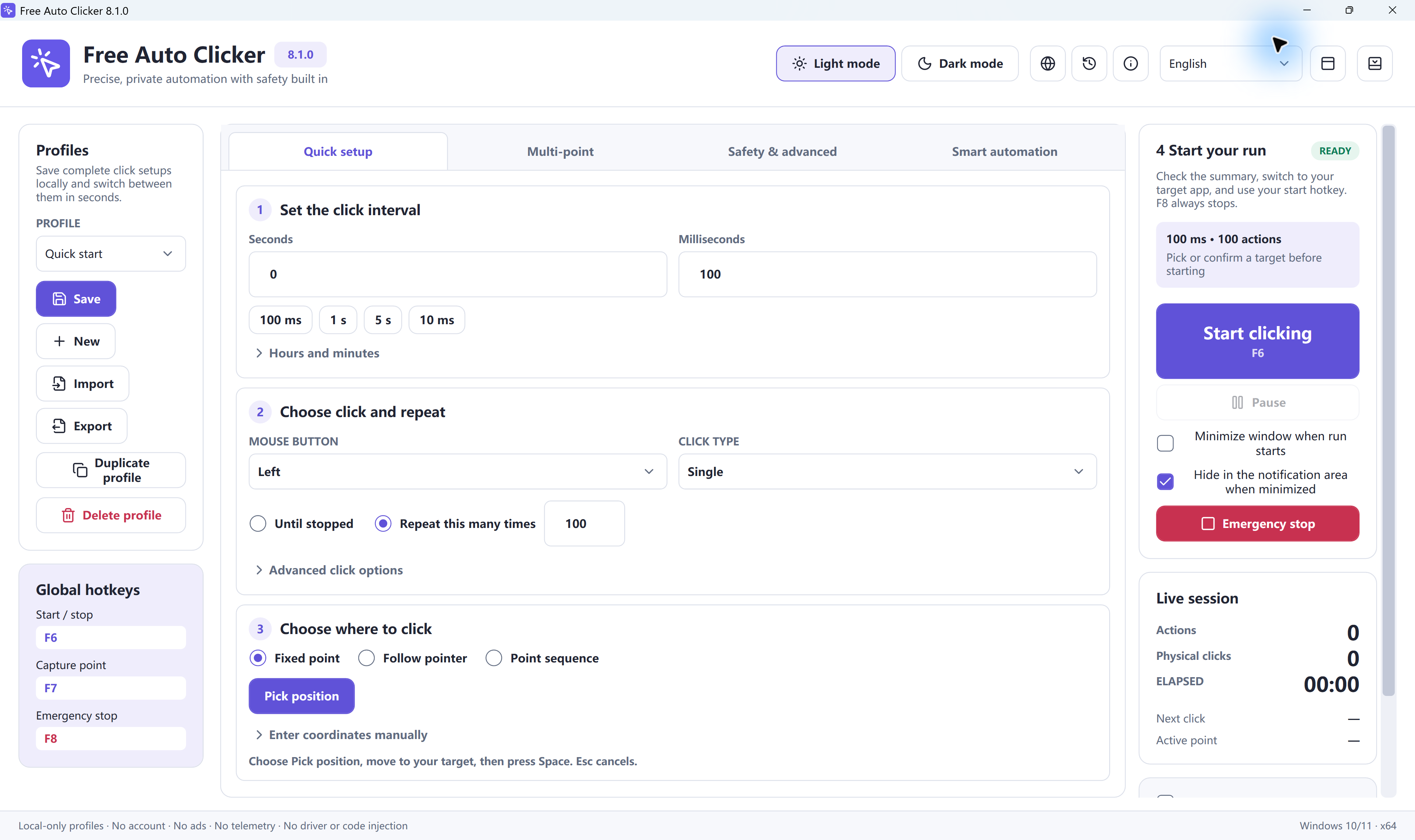
Actual Free Auto Clicker 8.1.0 controls. Use the three-click settings below; the screenshot shows example values. Select the image to enlarge.
For Windows 10: use the x64 desktop installer on version 2004 or later. Check the system first, inspect the current download details, then verify a three-click run before building a longer task.
Free Auto Clicker 8.1.0 repeats configured mouse actions on a visible foreground target. Its compatibility requirements are separate from the support lifecycle of Windows itself.
On this page
Check Windows 10 version and system type
- Check the Windows version. Open Start, type winver and open the result. Look at Version and OS Build. This download requires Windows 10 version 2004 / build 19041 or later.
- Check the installed architecture. Open Settings → System → About and read System type. Use this download for a 64-bit operating system, x64-based processor. It is not the 32-bit Windows build.
Microsoft explains where to find these details in its Windows device-information guide. If you have moved to Windows 11, use the Windows 11 download and setup page.
| Item | What to check |
|---|---|
| Operating system | Windows 10 version 2004 or later, x64. |
| Application version | Free Auto Clicker 8.1.0. |
| Download type | FreeAutoClicker.exe, a Windows desktop installer. |
| File verification | Compare the actual file with the current published verification details. |
| Clicking scope | Normal mouse input to a permitted, visible foreground target. |
Windows lifecycle: standard Windows 10 support ended on October 14, 2025. Running a compatible app does not extend the operating system's support. See Microsoft's current Windows 10 guidance.
Download, review setup and open the app
- Download from this page. The download button provides the Windows installer. Check the file you received against the published download details before running it; repeated downloads may have a number added to the filename by your browser.
- Read the setup choices and any Windows prompt. Review what you are being asked to install or authorize. If Windows or security software raises a warning, check the source, current verification information and installation and security information before proceeding.
- Finish setup and open Free Auto Clicker from Start. If setup reports an unmet requirement, use the exact requirement shown by that installer when troubleshooting. Then prepare the harmless test below.
Installing the program and running a click task are separate steps. Do not start a task until the target, click action and stop limit are set.
Verify Windows input with three slow clicks
Open the mouse-button test in a normal browser window. Click inside its pad once by hand, check that Left increases, then select Reset. Keep the pad in the same position and at the same zoom throughout the test.
- Start a fresh profile. Keep any wanted settings with Profiles → Save, then choose New. Set Hours = 0, Minutes = 0, Seconds = 1, Milliseconds = 0.
- Choose one action and a small limit. Use Left / Single, Standard click, Press to start / stop and Repeat this many times = 3. In Safety & advanced, set Start delay (seconds) = 0. If the maximum-click limit is enabled, use 3; if the maximum-runtime limit is enabled, use 1 minute, its minimum.
- Pick the pad's center. Select Fixed point → Pick position, or use the default F7 shortcut to open the picker. Move the pointer to the pad and press Space to confirm. Esc cancels. F7 does not confirm the point on its own.
- Return to the browser and start. Check the current Start/stop key in Global hotkeys, bring the unchanged pad to the foreground and press that key, F6 by default. Leave the mouse alone. Press F8 if the clicks go to the wrong place.
Pass condition: Left rises from 0 to 3, Right stays at 0, and the run ends. This verifies the selected input and limit on this test target; it does not guarantee that every Windows application accepts simulated input.
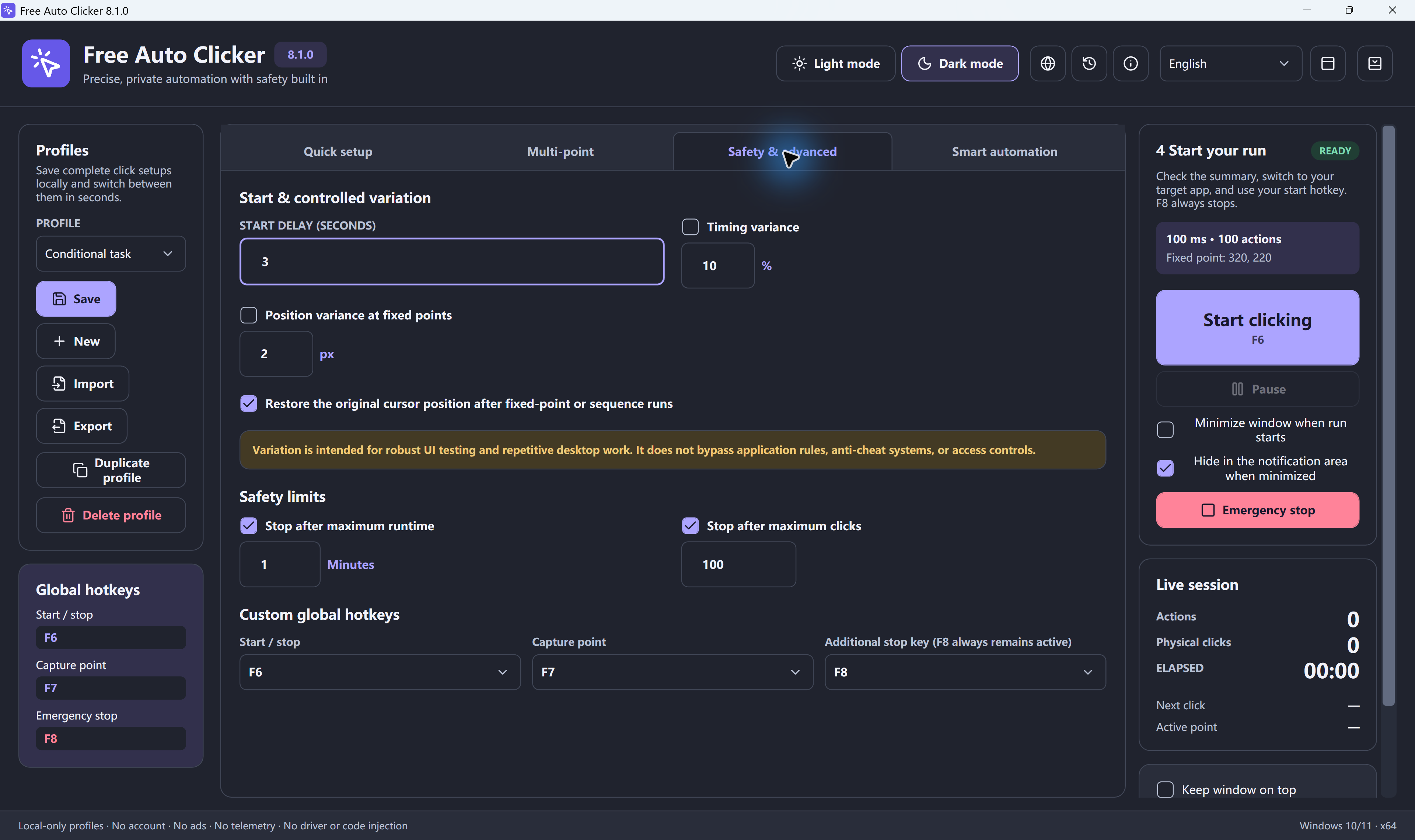
The full first-run guide includes more screenshots and explains how to move from the test to your own target.
Choose the target mode that fits the task
| Mode | Use it for |
|---|---|
| Fixed point | Repeated clicks at one saved position. Recheck it after moving, resizing or scrolling the target. |
| Follow pointer | Clicks wherever the real pointer is at that moment. Moving the pointer changes the target. |
| Point sequence | A list of enabled positions, each with its own Delay ms and Repeat. |
Choose Mouse button and Click type separately from the target mode. They apply to the whole profile, including every sequence row. See the left/right mouse-button guide for single, double and held actions.
Add multiple locations and save the tested setup
Choose Point sequence, then use Multi-point → Pick point (Space) to open the picker for each position. Move the pointer to the target and press Space to add it. Review each row's position, Delay ms, Repeat and enabled checkbox.
For a single full pass, enable Repeat the entire sequence before setting Repeat this many times = 1. Otherwise the overall repeat number counts individual actions. Follow the three-point sequence guide or record a short click workflow.
Profiles → Save keeps settings locally. Export writes a separate .fac file; Import reads one. Recheck coordinates and limits after changing computers, display scale or window layout.
Fix the symptom before changing the speed
The installer asks for administrator permission
A setup permission request is not a reason to grant every future request or run every target with elevated privileges. Read what the current installer is asking to change, verify the downloaded file and review the installation information. Keep installation questions separate from input problems after the app has opened.
Clicks land beside the intended control
Press F8. Restore the target's position, size, zoom and scroll state, then pick the point again. Display scale or monitor changes can invalidate a saved position. Window-relative targeting can follow a window's movement; it cannot follow a button after the contents rearrange.
The target misses clicks or the count is wrong
Repeat the three-click pad test with Left, Single and a one-second interval. Check the finite repeat rule and independent maximum-click/runtime limits. If the pad works but another target does not, inspect that target's input behavior and timing before shortening the interval. Double and Triple send more than one physical click per completed action.
The shortcut does nothing or the run waits
Check the current key assignments, shortcut-conflict messages and keyboard Fn mode. Check Start delay and whether Press to start / stop or Hold the start hotkey is selected. The hotkey guide and Windows troubleshooting guide explain these symptoms.
Keep the target visible and the task permitted
The app uses the real pointer and normal Windows input. It does not click a target while that target remains hidden or minimized. A bound window may be restored and brought to the foreground first; see the background-clicking explanation. Stop the run before using the mouse for another task.
Use workflows that permit automation, review setup choices, and keep a finite test limit and F8 available. For experimenting without installation, the online A/B/C demo runs only on this site's own demo targets; it does not control Windows applications.
Frequently asked questions
Which Windows 10 versions can run Free Auto Clicker 8.1.0?
The Windows download is for Windows 10 version 2004 or later, with an x64 operating system. Check the Windows version and System type on your PC before installing. Version 8.1.0 also supports Windows 11 x64.
Is there a 32-bit Windows 10 download?
The current download is the x64 Windows installer. It is not a 32-bit build. A computer having a 64-bit processor does not by itself mean that its installed operating system is 64-bit; check System type in Windows Settings.
Does app compatibility mean Windows 10 still has standard Microsoft support?
No. Compatibility describes whether this application can run on the specified system. Standard Windows 10 support ended on October 14, 2025. That lifecycle is separate from Free Auto Clicker compatibility; check Microsoft’s current guidance for your operating system.
Which keys start, capture a position and stop?
F6 is the default Start/stop key. F7 opens the position picker; move the pointer to the target and press Space to confirm, or Esc to cancel. F8 remains the fixed emergency stop. Check Global hotkeys because Start/stop and Capture point can differ between profiles.
Can it click a minimized target while I use another application?
It does not send clicks into a target while that target remains hidden or minimized. Window-relative targeting can try to restore a bound window and bring it to the foreground before normal input. It still uses the real pointer, so stop the run before doing a different mouse task.
Is the Windows app the same as the online auto clicker?
No. The Windows app is a free desktop download for permitted, visible foreground targets outside this site. The free online demo operates only on its own A, B and C targets. It cannot click other browser tabs, Windows applications or the device interface.
Ready to automate the clicks on your PC?
Use a permitted, visible foreground target. Verify the input and a small repeat limit before starting a longer Windows task.
Download for WindowsWindows 10/11 · x64 · Free · v8.1.0